Change a Delivery After Ordering on Qual-Chem.com

Updating your shipping address after placing an order doesn’t have to be complicated. Whether there’s a typo in your address or you’ve realized you need the package delivered elsewhere, here’s a step-by-step guide to make the process quick and easy.
Why You Might Need to Change Your Delivery Address
Mistakes happen, and so do unexpected changes! Here are some common reasons why customers need to update their delivery address:
You moved after placing the order.
There was a typo in the original address.
The package is being delivered to a P.O. box, and you need a physical address.
You need the package redirected to a work or alternate location.
No matter the reason, Qual-Chem makes it easy to work with our shipping partners to get your package to the right place.
UPS has options
The United Parcel Service’s (UPS) Intercept Program offers you a few options when it comes to delivery changes for your packages:
Request the parcel be returned to you
Redirect the UPS package to a different address for delivery
Reschedule your delivery date
Request the parcel be held for pick-up by the recipient at a UPS Access Point
Step-by-Step Guide to Changing Your Delivery Address
Follow these simple steps to change your delivery address for an order placed on Qual-Chem.com:
Step 1: Locate Your Tracking Number
After placing your order, you’ll receive a shipping confirmation email with your UPS tracking number. Look for this email in your inbox or spam folder if you don’t see it immediately.
Locate the tracking number from the shipping confirmation email you received from Qual-Chem. It’ll look something like this: 1Z12345E6205277936.
Copy the UPS Tracking Number

Qual-Chem Shipping Confirmation with UPS Tracking numbers

UPS.com
Step 2: Access UPS Tracking
Visit the UPS tracking page by clicking on the tracking number in your shipping confirmation email. Alternatively, you can go directly to UPS Tracking and enter your tracking number manually.
Paste the UPS tracking number that you copied in the above step.
Click the Yellow Track button.
You will be taken to your orders Tracking Page.

UPS Tracking Page
Step 3: Select "Change My Delivery"
On the tracking page, you will see an estimated delivery date and time
Scroll down until you see the Change Delivery Options section. Options include:
Hold for Delivery: Keep the package at a UPS location for pickup.
Reschedule Delivery: Choose a new delivery date.
Change Address: Update the delivery address to a new location.
Click the Change My Delivery button to begin the process.
Step 4: Complete the Form and Confirm the Changes
Follow the prompts to update your delivery details. Once completed, UPS will process your request and confirm the updated delivery information.
Note: Address changes may incur a fee, depending on UPS’s policies. Ensure you review any charges before confirming.
If you’re not a UPS My Choice member, you can still make changes as a guest.
UPS My Choice Members: Login for easier tracking and management. Membership is free and gives you more control over your deliveries.
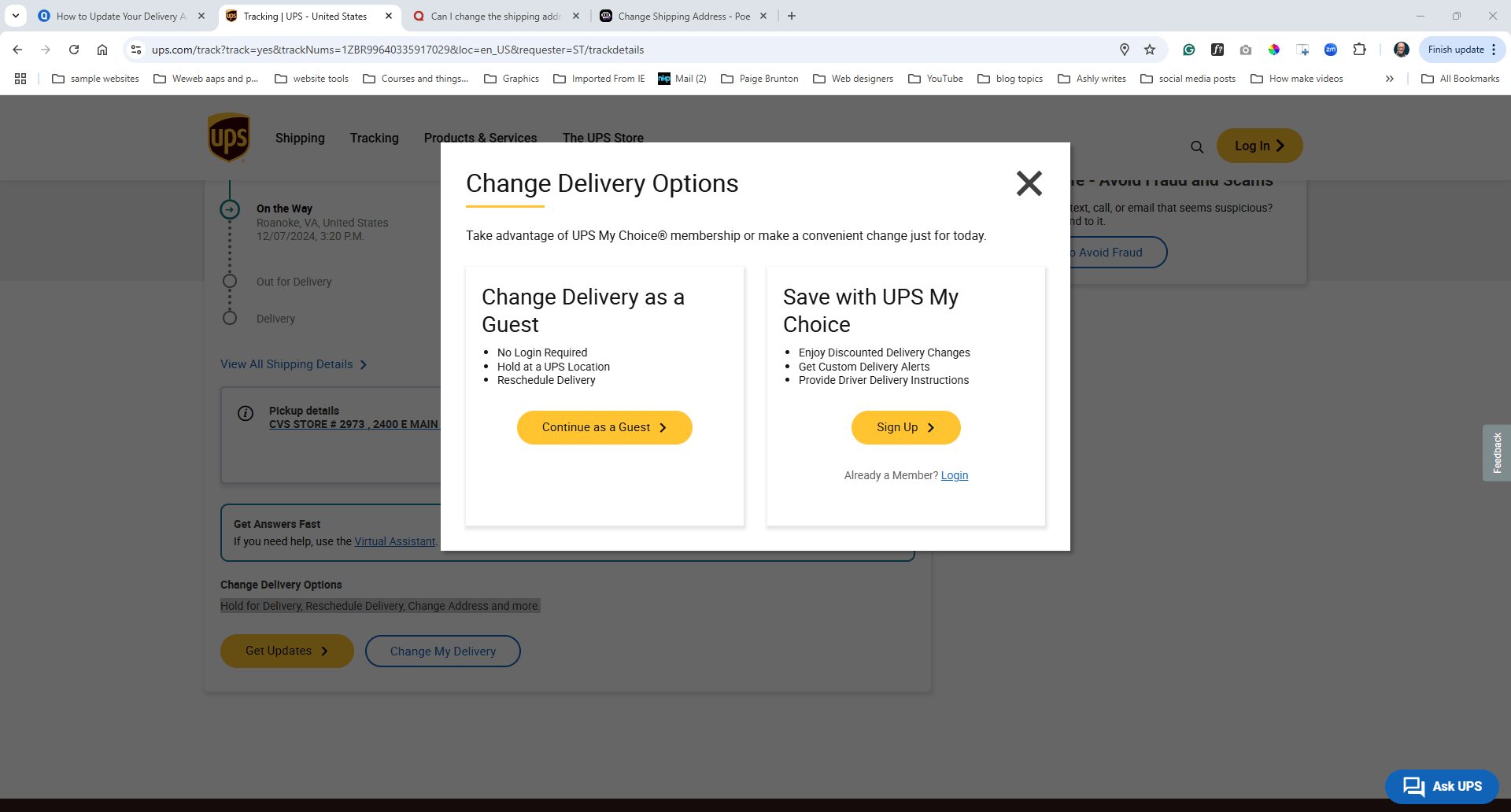
The pop up after selecting the yellow Change Delivery button
Contact UPS Directly if Needed
If you prefer, you can call UPS customer service at 1-800-742-5877 to request an address change. Be prepared with your tracking number and the new address.
UPS also offers an online chat option for assistance. Visit UPS.com and look for the live chat feature.
Important Things to Know
Eligibility for Address Changes
Packages must be in transit. If the package is already out for delivery or a delivery attempt has been made, changes may not be possible.
Restrictions may apply for expedited services (e.g., Next Day Air).
Fees
Changing your delivery address may involve a fee, especially if you’re using UPS My Choice or making the change late in the delivery process.
Timing
The sooner you make your request, the better your chances of successfully changing the address. Don’t wait until the day of delivery.
Why Use UPS My Choice?
UPS My Choice is a free service that gives you more flexibility and control over your deliveries. Here’s why it’s helpful:
Notifications: Get real-time updates on your package status.
Easy Address Changes: Quickly request address updates online.
Delivery Rescheduling: Choose a new date or location for your delivery.
Access Point Options: Redirect your package to a nearby UPS store for pickup.
UPS My Choice Memberships benefits and sign up for free here
Final Tips to Avoid Future Issues
Double-Check Your Address: Always verify your shipping address at the time of order to avoid delays or complications.
Use UPS My Choice: Sign up for UPS My Choice for added control. It’s free and makes managing your deliveries much easier.
Act Quickly: Address changes are more likely to succeed if requested shortly after the package ships.
By following these steps, you can easily update your delivery details and ensure your package gets to the right place. If you run into issues, Qual-Chem’s customer support team is here to help—but starting with UPS directly is always faster!

Answers to your frequently asked Qual-Chem questions.
FAQs
-
Yes, but only through UPS’s system. Once the package has left our warehouse, Qual-Chem cannot make changes directly. Follow the steps above to request an address change through UPS.Description text goes here
-
If UPS cannot deliver your package due to an incorrect address, it will be returned to Qual-Chem. In such cases, contact our customer support team to arrange a re-shipment. Use the form on the Contact page to connect with Customer service here or send an email to info@qual-chem.com or send an email to info@qual-chem.com
-
No, you can request the change and select the option that best suits your situation. You can start the process here.
-
If you missed a delivery, you received a UPS Delivery Notice letting you know that your driver was unable to deliver your package. Scan the Delivery Notice to track it and find the nearby UPS Access Point location where it was delivered.
You can also use your UPS Delivery Notice number online to request a hold on eligible packages. In addition, UPS My Choice members can use the Delivery Planner to request a hold.
-
No, you can always use the Sign in as a guest option
Becoming a UPS My Choice member is free and gives you greater control over when and where your shipments will be delivered.
Members have the option to have deliveries brought to a different address, be delivered on a different day or pick up deliveries at a UPS location, as well as tell your UPS driver where to leave packages when you aren't home.
Need Help?
If you encounter any issues while updating your delivery address, don’t hesitate to contact our customer support team for assistance. We’re here to help!
info@qual-chem.com
Updating your delivery address doesn’t have to be stressful. With this guide, you’ll be able to manage your shipment and ensure it gets to the right place with minimal hassle. Happy shipping!